
Turn on recording, AI and remote control
Decide what calls in your organization may capture, and what AI may see. You need to be an Org owner or Org admin; other people can read the result.
Pick a preset
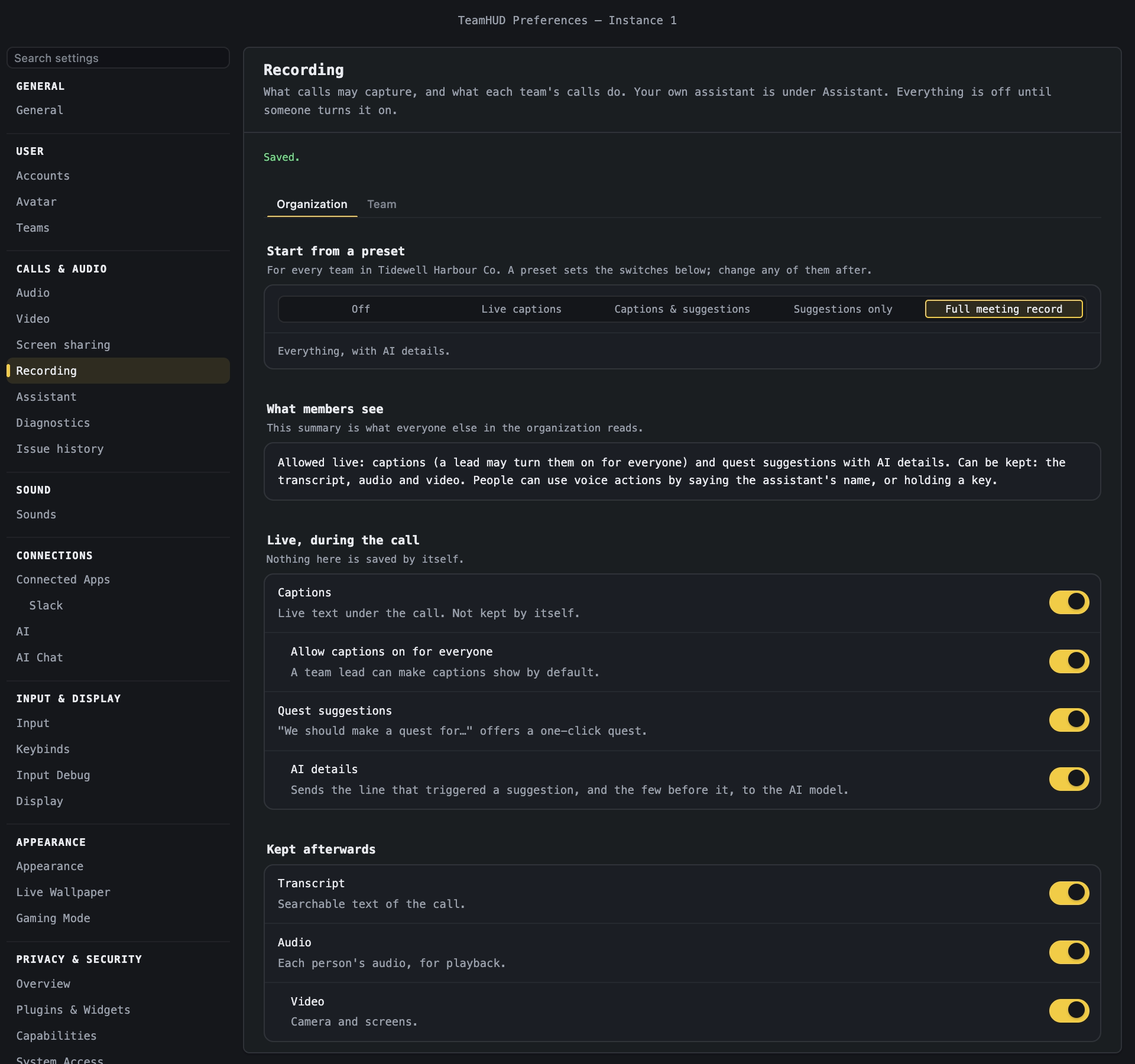
Section titled “Pick a preset”- Open Preferences → Recording. Choose your organization at the top if you have several.
- On the Organization tab, under Start from a preset, pick one.
- Adjust any switch below it. The note under the presets says “Custom” once you do.
| Preset | What it allows |
|---|---|
| Off | Nothing is recorded or transcribed. |
| Live captions | Captions for everyone; nothing kept. |
| Captions & suggestions | Captions, quest suggestions, a kept transcript. People may transcribe themselves while holding a key. |
| Suggestions only | Quest suggestions from the last 5 minutes; nothing kept. |
| Full meeting record | Everything, with AI details: captions, suggestions, transcript, audio and video. |
A preset changes only the capture switches. It never touches AI chat or remote control. Full meeting record sends the sentence that triggered a suggestion, and the few before it, to an AI model. Choose it on purpose.
Switch things on one by one
Section titled “Switch things on one by one”The same page has the switches the presets set.
- Live, during the call. Captions; Allow captions on for everyone; Quest suggestions; AI details (needs suggestions).
- Kept afterwards. Transcript; Audio; Video (needs audio).
- Languages people speak. Pick at least one so transcription knows what to expect.
- What members see. A plain sentence everyone in the organization can read.
A switch that depends on another is greyed out until you turn that one on.
AI chat
Section titled “AI chat”Under AI chat, three switches. Each is a limit: even when on, each person must also choose to use it.
- Include teammates’ names and roles. AI chat may add them to what it sends to the AI model on team questions.
- Allow web search. AI chat may send the search queries it writes to a search service. Each person still approves every search unless they choose otherwise.
- Allow reading Slack messages. AI chat may read a Slack conversation a person asks it to catch them up on.
Remote control
Section titled “Remote control”Remote control lets someone drive another person’s screen in a call. It is off for every organization, and the person being controlled is asked first. There is not yet a switch for it in the dashboard or in Preferences, so it stays off unless your Org owner or Org admin sets allowRemoteControl through the recording-policy API. See Screen sharing for what a person sees.
The web version
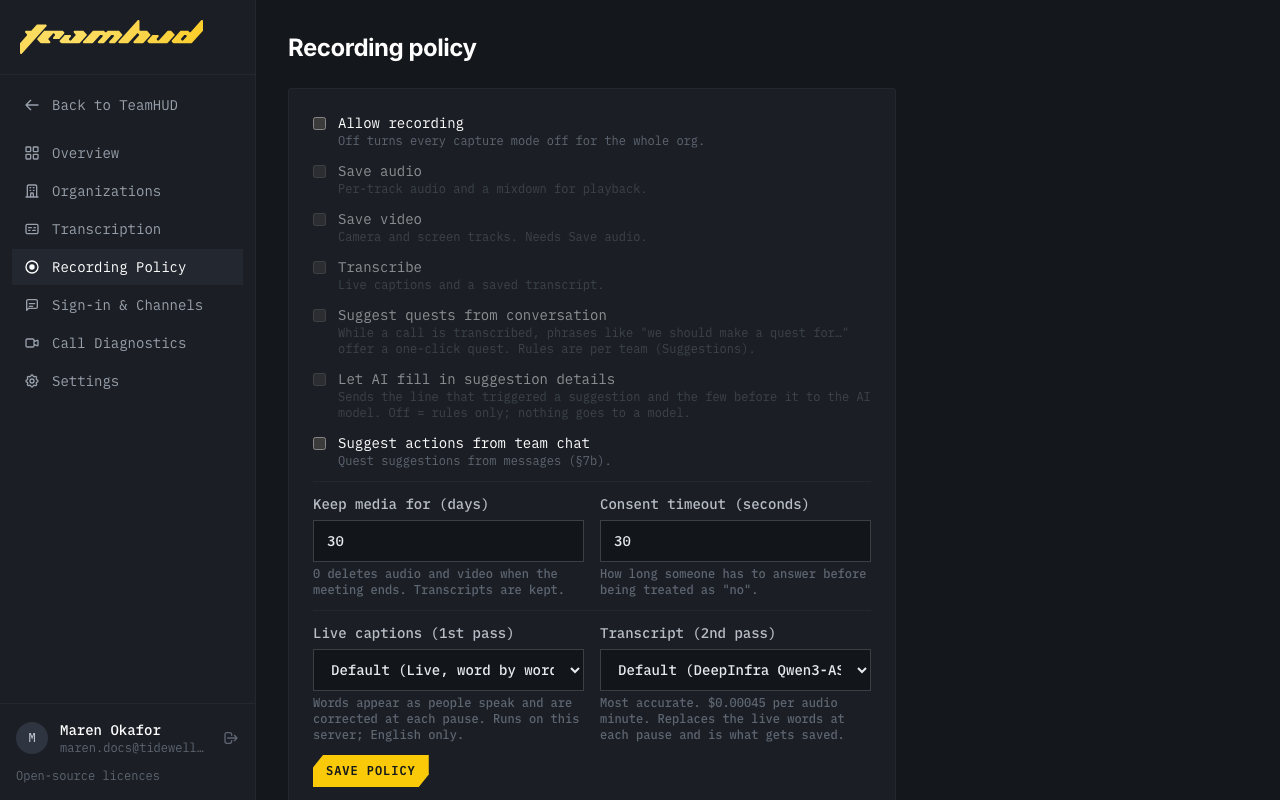
Section titled “The web version”Recording Policy in the dashboard has the master switch Allow recording, Save audio, Save video, Transcribe, the suggestion switches (Suggest quests from conversation, Let AI fill in suggestion details, Suggest actions from team chat), and Keep media for (days). Two drop-downs pick the transcription engines: Live captions (1st pass) and Transcript (2nd pass), each on Default until you choose. It has no presets or AI chat switches. Keep a team’s call recorded, further down, turns on automatic recording per team: tick the parts to capture (Live captions, Quest suggestions, Keep transcript, Save audio, Save video). Nothing is on until you tick one.
Who is told
Section titled “Who is told”- Everyone in a call sees the REC or CC notice while capture is on.
- Guests are asked to consent. Someone who declines or does not answer within 30 seconds is removed from the call.
- A person’s own transcript stays theirs: you cannot read it by default.
- What members see shows every member what the organization allows.
If it goes wrong
Section titled “If it goes wrong”- A switch is greyed out. It needs the one above it first.
- “Recording is turned off for your organization.” In a call, an Org owner or Org admin sees Allow recording. Everyone else is told to ask one.
- Upgrade required. Recording and transcripts need a plan that includes them.
- Transcription does nothing. No provider is set. Open Transcription in the dashboard and use Test connection. Self-hosters: Org policies.