
Add an MCP tool
One registration makes your tool available to both outside MCP clients (Claude Code and others) and the built-in AI chat. There is no second API for the AI chat: it reads the same list of tools.
Before you start
Section titled “Before you start”- A plugin that runs in the app, as in Build your first plugin.
zodas a dependency, for the input schema.
-
Get the MCP service. Plugin start order is not fixed, so ask for it, and retry for a few seconds if it is not up yet. This is how the Slack plugin does it:
private registerAiTools(tries = 0): void {let mcp: McpRegistrarLike | null | undefined;try { mcp = this.services.get<McpRegistrarLike>('MCPServerService'); } catch { return; }if (mcp?.registerTool) { this.unregisterTools = registerMyTools(mcp); return; }if (tries < 60) setTimeout(() => this.registerAiTools(tries + 1), 500).unref?.();}Declare only the slice you use, so your plugin does not import the MCP package:
export interface McpRegistrarLike {registerTool: (name: string, description: string, inputSchema: Record<string, z.ZodTypeAny>,handler: (args: any) => Promise<ToolResult>, pluginName?: string) => unknown;unregisterTool?: (name: string) => void;}type ToolResult = { content: Array<{ type: 'text'; text: string }>; isError?: boolean }; -
Register the tool. Name, description, a zod input shape, a handler, and your plugin slug:
import { z } from 'zod';export function registerMyTools(mcp: McpRegistrarLike): () => void {mcp.registerTool('slack_catch_up', // a string literal on purpose: a policy test scans for it'Read one Slack channel, DM or thread the user names, for the last few hours, so you can catch them up. Read-only: never posts.',{channel: z.string().min(1).max(200).describe('Channel id (e.g. "C0123ABCD") or name (e.g. "#teamhud").'),hours: z.number().optional().describe('How far back to read, in hours (default 24, max 168).'),},async (args) => {// do the work; return text, or isError for a failure the model should seereturn { content: [{ type: 'text', text: 'Nothing new in that conversation.' }] };},'datasource-slack',);return () => { mcp.unregisterTool?.('slack_catch_up'); };}Write the description for a model: what it does, what it returns, and whether it changes anything. Every
.describe()on an argument is read by the model too. Registering a name that exists replaces the old tool and logs a warning. -
Return text, and keep secrets out of it. The handler returns
contenttext. ReturnisError: truewith a plain message for expected failures. Log counts and error kinds, never what a person wrote. -
Unregister on shutdown. Call the function you returned from
shutdown(), so switching your plugin off removes the tool. -
Decide the approval. The AI chat asks the person before running any tool it does not know to be safe. By default your new tool asks every time. That is the intended result, and nothing needs to be added for it.
Only add your tool to
AUTO_APPROVEinplugins/widget-ai-chat/src/service/toolPolicy.tsif, after reading your handler, it passes all four tests: it returns no secret, returns no other person’s words or identity, changes no state, and sends data nowhere the caller names. Name the reason in the list. Add anything doubtful toNEVER_AUTOinstead, with the reason. -
Check it is called. With the app running, connect an agent (Connect an agent) and list the tools, or open the AI chat and ask it to use your tool.
How the AI chat sees your tool
Section titled “How the AI chat sees your tool”The AI chat pulls tools from the running MCP service in-process, with no network call. In plugins/widget-ai-chat/src/service/tools.ts, listMcpTools() returns every registered tool as a name, description and JSON Schema, and callMcpTool(name, args) runs it and flattens the result to text. The model gets your description and schema exactly as written.
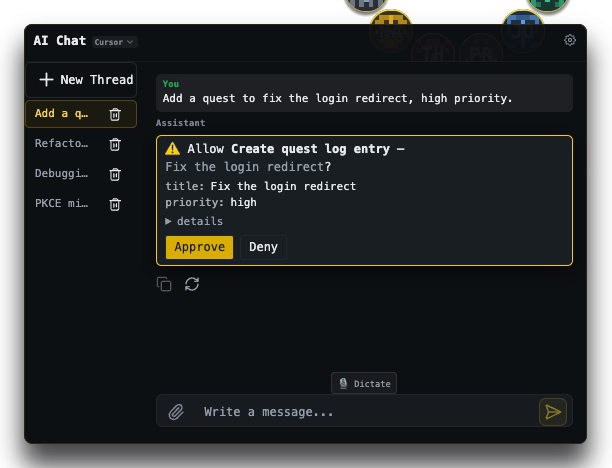
When the model calls a tool that is not on the auto-approve list, the chat pauses and shows an approval card in the thread with Approve and Deny. The tool runs only after Approve. The thread shows “Waiting for approval” until then.
Who else can call it
Section titled “Who else can call it”An outside client must present a token whose scope covers the tool. A tool with no entry in TOOL_SCOPE_MAP (plugins/mcp-server/src/auth/ScopeMap.ts) needs the all scope, which only the admin token has. Leave it unlisted unless a narrower scope is clearly right.
What you’ll see
Section titled “What you’ll see”Your tool appears in an agent’s tool list, and the AI chat can use it. A call from the chat shows the approval card unless you listed the tool as safe.
If it goes wrong
Section titled “If it goes wrong”- The tool is missing. Registration ran before the service existed and gave up. Keep the retry in step 1.
- “Server not initialized”.
registerToolwas called before the MCP server started. Retry later, not at import time. - A client says it is not allowed. The token lacks the tool’s scope. See Preferences, Developer.
- A policy test fails after a rename.
toolPolicy.inventory.test.tschecks that every name in the policy still exists. Update the policy with the rename.
Where next
Section titled “Where next”- Register voice commands for the same tool.
- MCP server reference.