
Write a backdrop shader
Write one WGSL function and TeamHUD draws it behind your hubs, or across the desktop as a live wallpaper.
Before you start: the TeamHUD app running on a computer with WebGPU, and a text editor (or the editor built into Preferences). WGSL is the only shader language supported.
The contract in short
Section titled “The contract in short”A backdrop is an animated layer drawn behind the hub chrome on a transparent, click-through overlay. Your shader draws pixels only; it never changes what is clickable. You define one function, backdrop_main, and return premultiplied vec4<f32>. Alpha is real transparency: alpha 0 lets the desktop show through.
| Input | What it is |
|---|---|
uv |
Screen position, 0 to 1, top-left origin (y down). |
resolution |
Drawing-buffer size in device pixels. px = uv * resolution. |
color |
Global backdrop colour fallback (linear RGB). |
widget_count |
Number of live hubs in ws. There is no fixed maximum. |
ws |
The hubs, packed as 4 vec4s each: v0 = position and velocity, v1 = size, corner radius, flags, v2 = goo-merge hints (ignore), v3 = the hub’s colour and opacity. Widget i is at ws[i*4] to ws[i*4+3]. |
params |
Your declared options, 6 vec4s. Option N is params[N/4][N%4]; booleans arrive as 0 or 1. |
time |
Seconds. Advances only when the manifest says "animated": true. |
Two rules the compiler cannot enforce:
- Write
WS_LENverbatim in thewstype. It is a token; the runtime replaces it with the real array length and grows it as more hubs appear. - Loop to
i32(widget_count), never to a constant, or the last hubs are silently dropped.
A minimal shader
Section titled “A minimal shader”This draws a soft glow around every hub, tinted with each hub’s own colour. Save it as soft-glow.wgsl.
/* @teamhud-shader {  "schemaVersion": 1,  "id": "soft-glow",  "name": "Soft glow",  "description": "A tinted glow around each hub.",  "language": "wgsl",  "animated": false,  "options": [    { "key": "glow", "label": "Glow radius", "type": "number", "min": 10, "max": 200, "default": 60 },    { "key": "intensity", "label": "Intensity", "type": "number", "min": 0, "max": 100, "default": 70 }  ]} */
fn sd_round_rect(p: vec2<f32>, half_ext: vec2<f32>, r: f32) -> f32 {  let q = abs(p) - half_ext + vec2<f32>(r);  return length(max(q, vec2<f32>(0.0))) + min(max(q.x, q.y), 0.0) - r;}
fn backdrop_main(  uv: vec2<f32>,  resolution: vec2<f32>,  color: vec3<f32>,  widget_count: f32,  ws: array<vec4<f32>, WS_LEN>,  params: array<vec4<f32>, 6>,  time: f32) -> vec4<f32> {  let px = uv * resolution;  let n = i32(widget_count);  let glow_radius = params[0].x;  let intensity = params[0].y / 100.0;
  var acc = vec3<f32>(0.0);  var alpha = 0.0;  for (var i = 0; i < n; i++) {    let pos = ws[i * 4 + 0].xy;    let size = ws[i * 4 + 1].xy;    let radius = ws[i * 4 + 1].z;    let tint = ws[i * 4 + 3].xyz;    let hub_opacity = ws[i * 4 + 3].w;    let d = sd_round_rect(px - pos, size * 0.5, radius);    let g = (1.0 - smoothstep(0.0, glow_radius, max(d, 0.0))) * intensity * hub_opacity;    let c = select(color, tint, dot(tint, tint) > 0.0001);    acc += c * g;    alpha = max(alpha, g);  }  return vec4<f32>(acc, alpha);}
The header comment is a JSON manifest. Each numeric option becomes a slider in the theme editor, each boolean a checkbox, in a folder named after your shader. Values a person edits are saved per shader into their theme; untouched options keep your defaults. "hubBackgrounds" is "hide" by default, so your effect replaces the hub’s own background; set "show" to draw behind it.
Load and test it
Section titled “Load and test it”-
Open the editor. Preferences, Appearance, Appearance tab, New theme (see Create a theme).
-
Add your shader. In the Sandbox backdrop row, press Import and choose your
.wgslfile, or New shader to start from the selected backdrop’s code. The source editor opens below the preview. -
Edit and watch. Edits compile into the preview as you type. A compile error appears inline with its line number, and the previous shader stays on screen.
-
Save shader. Press Save shader to keep the code. It is stored as a
.wgslfile in~/.teamhud/shaders, and you can also drop a file there yourself. Export saves it as a file; Delete removes your copy. -
Apply. Press Apply to HUD. Before it swaps, TeamHUD compiles the shader on the GPU and renders one frame to check it does not paint the whole screen one opaque colour.
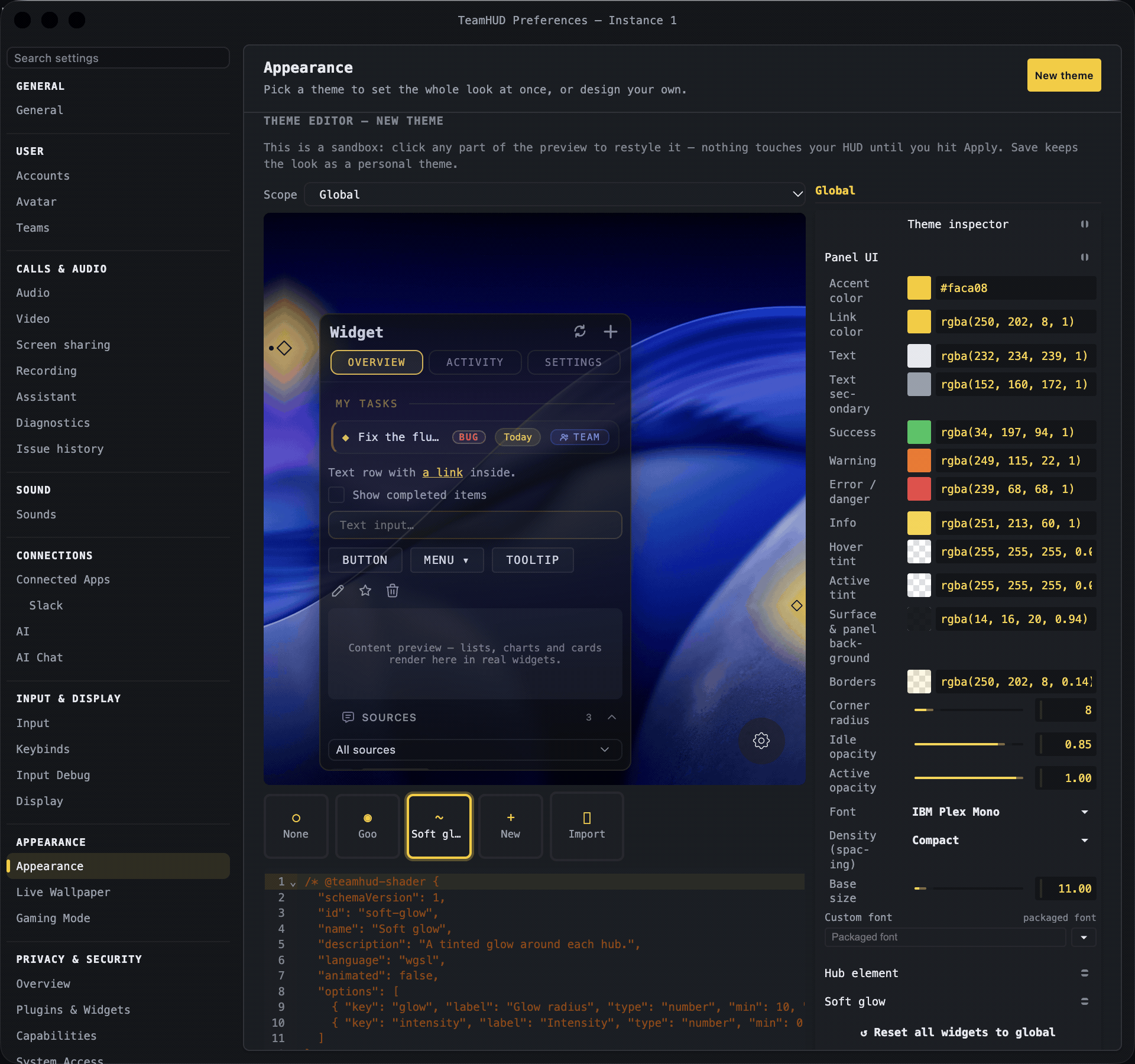
What you’ll see: a glow around each hub that follows the hub when you drag it, plus Glow radius and Intensity sliders in the inspector. A theme that uses your shader stores it as the backdrop user:soft-glow.
As a live wallpaper
Section titled “As a live wallpaper”The same contract runs as a desktop background. Go to Preferences, Appearance, the Live Wallpaper tab, and press Import .wgsl or New from selected; saved wallpapers live in ~/.teamhud/wallpapers. A wallpaper has no hubs, so ignore ws and return alpha 1 everywhere. The built-in Aurora wallpaper is a good model.
Live wallpapers can also declare pointer, pointer_trail and wallpaper_tex (the user’s OS wallpaper) as extra inputs. Elsewhere they are empty. Declared parameters are matched by name, so leave out what you do not use.
Performance rules
Section titled “Performance rules”- Prefer
"animated": false. A static shader redraws only when a hub moves, so it idles like the goo backdrop."animated": trueredraws every frame and costs battery. Say so in the description. - Keep loops to
widget_count. Do work per hub, not per pixel against a fixed number. - Budget buffers. Persistent buffers and passes (for trails or fluid) are capped at 8 buffers, 24 passes and 128 renders per frame. A shader with passes keeps stepping briefly after hubs stop (
settleMs);"idle": "always"never sleeps. - Stay small. A shader file is limited to about 64 KB and 24 options.
If it goes wrong
Section titled “If it goes wrong”- Nothing draws. Check you return alpha above 0 and that you loop to
i32(widget_count). Thewspositions are device pixels, so compare againstuv * resolution, notuv. - “Does not compile”. The error shows line and column in the editor.
WS_LENmust be written verbatim, and the file needs both abackdrop_mainentry and a@teamhud-shaderheader. - Apply refuses the shader. It painted the whole screen one opaque colour. Return alpha 0 away from your effect.
- Import refuses it. The manifest
languagemust be"wgsl". - No effect on a computer without WebGPU. The backdrop stage needs a GPU adapter.
For the complete contract, including persistent buffers and extra inputs, see plugins/three-stage/src/backdrop/CONTRACT.md in the repository.