
Invite people to your team
Bring someone onto your team in a minute. You need to be a Team lead of that team. Not a lead? Ask one. See Lead a team.
Open the invite panel
Section titled “Open the invite panel”- Open Preferences → Teams and pick your team in the left rail.
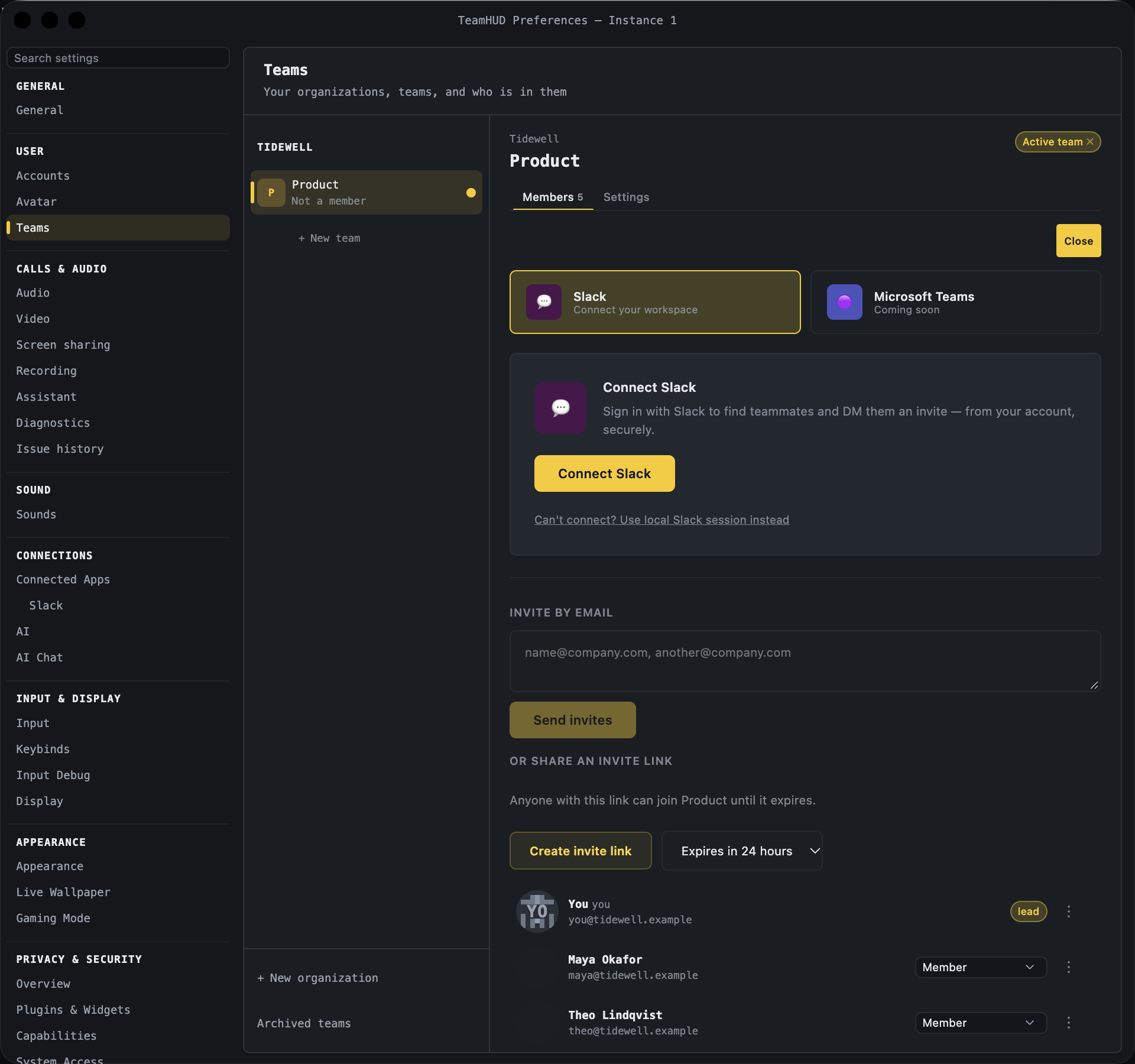
- On the Members tab, click + Invite. The panel opens above the member list. Close hides it.
- Choose how to invite: Slack, email, or a link.
Invite by Slack
Section titled “Invite by Slack”- On the Slack tab, click Connect Slack and sign in. TeamHUD reads your workspace’s people to find them.
- Tick the teammates to invite. Optionally add a message. The invite link is always included.
- Click Send N Slack invites. Each person gets a direct message from you.
You see N Slack invites sent and a line per person (DM sent or the reason it failed). Each person gets their own link, so a forwarded message cannot use up someone else’s. Microsoft Teams shows “Coming soon”. Use email or a link for those people.
Invite by email
Section titled “Invite by email”- Under Invite by email, type one or more addresses, separated by commas.
- Click Send invites.
Each address shows invited, or the error. People join as a Member. An email invite works once, for that address, and lasts 7 days. If the server has no email set up, the invite is still created; copy its link from the Invited list and send it yourself.
Share a link
Section titled “Share a link”- Under Or share an invite link, pick how long it lasts: Expires in 1 hour, 24 hours, 7 days or 30 days.
- Click Create invite link, then Copy.
- Send it however you like. Create a new link makes another one.
The Invited list
Section titled “The Invited list”Below the members, Invited lists everyone still waiting, with their role and when it was sent. A link shows as Invite link. Open the ⋮ menu on a row:
| Action | What it does |
|---|---|
| Copy invite link | Copies the link for that invite. |
| Resend | Sends the email again. Only on invites that have an address. |
| Cancel invite | Revokes it. The link stops working. |
If it goes wrong
Section titled “If it goes wrong”- The person says the invite is expired. Create a new one. Email invites last 7 days.
- They cannot join. Your organization may allow only some sign-in methods. They must be able to sign in one of those ways. An Org owner or Org admin sets this in Sign-in & channels.
- Free organization is full. A free cloud organization has a seat limit. Joining stops until an Org owner changes the plan.
- I want to make someone a lead. Everyone you invite here joins as a Member. Promote them once they are in. See Manage your team.