
Privacy and security settings
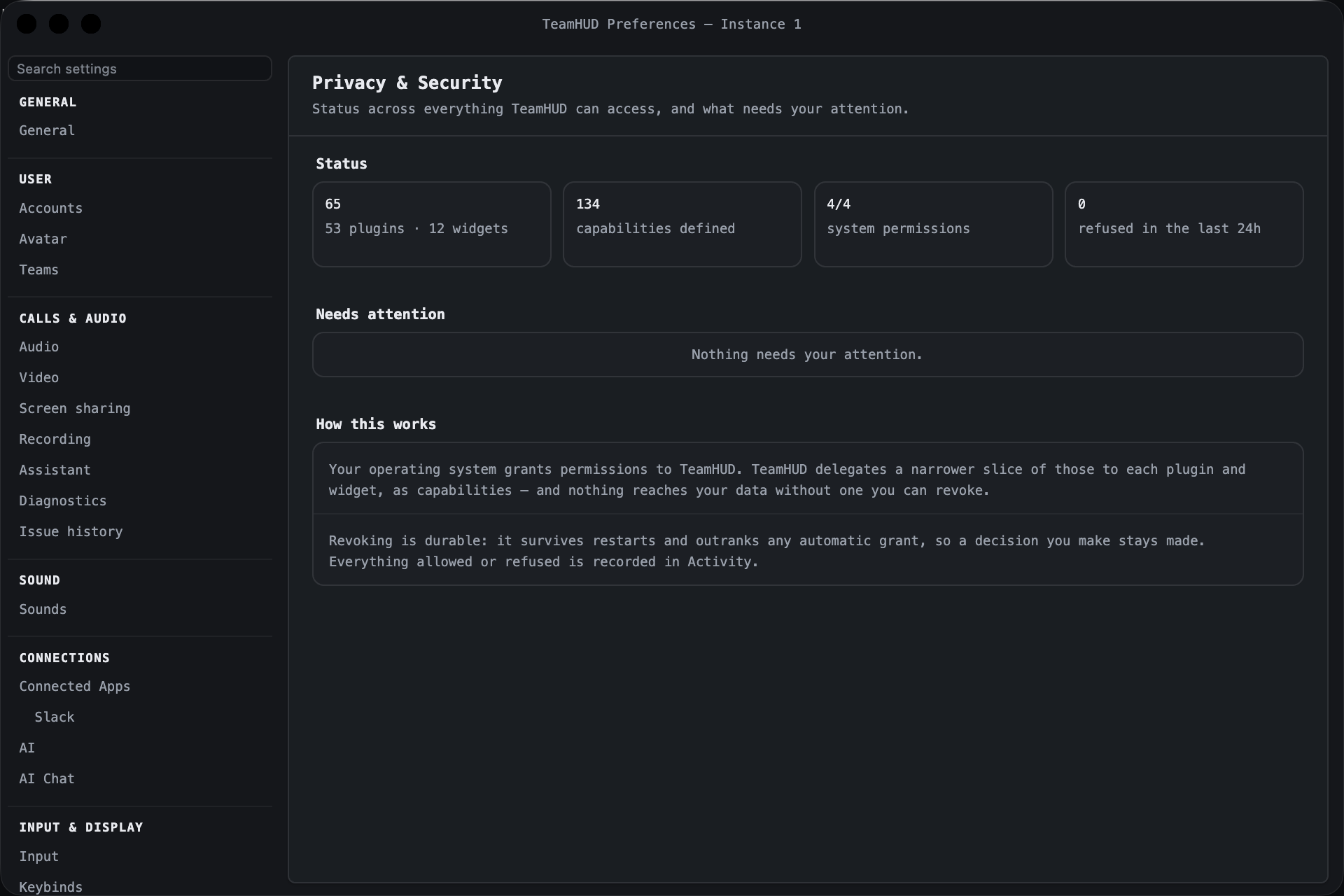
Preferences, Privacy & Security is where you see, and take back, what TeamHUD can reach. The model: your operating system grants permissions to TeamHUD, and TeamHUD hands a narrower slice of those to each plugin and widget as capabilities. Nothing reaches your data without a capability, and you can revoke most of them. A revoke is durable: it survives restarts and outranks any automatic grant.
Overview
Section titled “Overview”A status page. It changes nothing itself; every tile and row jumps to the tab that does.
| Control | What it does | Default | Notes |
|---|---|---|---|
| Plugins and widgets tile | Counts registered components (“N plugins · N widgets”). Opens Plugins & Widgets. | n/a | Live count. |
| Capabilities tile | Number of capabilities TeamHUD defines. Opens Capabilities. | n/a | |
| System permissions tile | Granted over known OS permissions, e.g. 2/3. Opens System Access. |
n/a | Permissions the OS cannot report are left out of the tally. |
| Refused in the last 24h tile | Count of refused requests. Opens Activity. | n/a | |
| Needs attention | Lists things you can act on: an OS permission not granted (Fix), a component that asked for a capability it never declared (Review), a component that was refused (Review). | “Nothing needs your attention.” when clear | Each button opens the right tab, already filtered. |
| How this works | Two short explanations of the model above. | n/a | Read-only. |
Plugins & Widgets
Section titled “Plugins & Widgets”Every plugin, widget and custom widget, with the capabilities each holds. Click a row to expand it.
| Control | What it does | Default | Notes |
|---|---|---|---|
| ⚠ Needs attention / All | Show only components with refusals or undeclared requests, or all of them. | Needs attention | Click Clear filters on an empty result to see everything. |
| Every kind / plugins / widgets / Custom | Filter by kind of component. | Every kind | |
| Search names or capability ids… | Finds components by name, id, plugin, or any capability they hold. | empty | Typing a capability (for example notifications) lists everything that touches it. |
| Row badges and counts | Kind badge (plugin, widget, custom widget), an untrusted badge for third-party code, then ✓ granted, ⊗ revoked, ⚠ denied, ⚠ undeclared. |
n/a | Read-only. |
| Capability toggle (in an expanded row) | Grant or revoke that one capability for that one component. | Each component starts with what it declares and is allowed | Where a toggle is missing, the row says why: Required by this component (remove the component to remove it), Never available to third-party code (critical capability), Not in the capability catalog, or Enforced at the caller, not this component. |
| Granted but not requested | Capabilities a component still holds but no longer asks for. | n/a | Safe to revoke. |
| Recent refusals | Shows denied and never-declared requests, with View in Activity. | n/a | |
| Manage plugins | Shown on a disabled component. Opens Plugins, Manage. | n/a | A disabled component’s capabilities are inert; its grants are kept. |
Capabilities
Section titled “Capabilities”The full catalog, and who holds each capability. A reference view: use it to answer “what does this permission mean, and who has it?”
| Control | What it does | Default | Notes |
|---|---|---|---|
| Flat list / By tier / By sensitivity | How the catalog is grouped. | Flat list | |
| critical / high / medium / low | Filter chips by sensitivity. Several can be selected. | none selected (all shown) | |
| Search id, name or description… | Filters the catalog. | empty | |
| Row badges | Tier and sensitivity, plus required (cannot be revoked) and first-party only (never grantable to third-party code). | n/a | |
| Expanded row | Lists each component using the capability, with whether it is granted or revoked, and a button to jump to that component. | n/a | Granting and revoking happens in Plugins & Widgets, not here. |
System Access
Section titled “System Access”What your operating system has granted TeamHUD. TeamHUD can only pass on what it holds here.
| Control | What it does | Default | Notes |
|---|---|---|---|
| Permission rows (name varies by OS) | Show ✓ Granted, ⚠ Not granted, or — Not confirmed (the OS cannot be asked; it confirms itself the first time TeamHUD uses it). Under each: which features need it, the capability it enables, and which components hold that capability. | n/a | If components hold a capability but the OS permission is missing, the row warns they cannot use it. Some changes take effect after restarting TeamHUD. |
| Grant access | Asks the OS for the permission. | Shown only when not granted and the OS allows asking | |
| Open Settings | Opens the matching page in your OS settings. | Shown when the OS has such a page | |
| Request all | Asks for every missing permission. | Shown only when something is missing |
Empty on a platform that needs no special permissions.
Account Access
Section titled “Account Access”What the server holds for your account. You must be signed in; otherwise the tab only tells you to sign in. Everything here is revoked on the server, so it takes effect on every device.
| Control | What it does | Default | Notes |
|---|---|---|---|
| Refresh | Reloads the status. | n/a | |
| Sign out others | Invalidates sign-in on your other machines; keeps this one. | n/a | |
| Sign out everywhere | Signs out every device, including this one. | n/a | A device already open stays usable until its access token expires (up to an hour); this is not an instant kill switch. |
| Connected on the server (one row per mail connection) with Revoke | Disconnects that mailbox’s server-side registration and revokes its token with Google. Shows “Watch armed” or “Not armed yet” and last renewal. | n/a | If the server holds none, the tab says so. |
| Revoke all | Drops every mail registration above. | n/a | |
| What this cannot do | Explains the limit: the server holds only enough to notice that mail arrived (headers, never bodies). Your Gmail, Drive and Calendar access and any mail passwords stay encrypted on your machine. | n/a | To cut off mailbox access itself, remove TeamHUD in your Google account’s third-party access page, or disconnect the datasource under Preferences, Connections. |
Activity
Section titled “Activity”A log of every permission decision TeamHUD makes.
| Control | What it does | Default | Notes |
|---|---|---|---|
| Refused / Allowed / Everything | Filter by outcome. Rows are badged ✓ Allowed, ⚠ Denied or ⚠ Not declared. | Refused | Opening Activity from a component row shows Everything for it. |
| Last hour / Last 24h / Last 7 days / All time | Time window. | Last 24h | |
| Search component, capability or reason… | Filters the events. | empty | |
| Component button on a row | Opens that component in Plugins & Widgets. | n/a | |
| Clear history | Deletes the recorded events. | n/a | Does not undo any grant or revoke. |